Context
In the first year of the Game Development course we were following a class focused on physics and simulations of games. We learned about use of vectors, matrices, DOT product, collision specific objects and much more. To test the students’ advancements regarding the topics, they were tasked to choose from a list of games to remake. Students had to work with Monogame and C#, with the main focus being the implementation of the game’s physics. While the assignment mainly focused on the physics, the game components and game loop still had to be made to make it a fledged out game.
I chose to remake the popular game Air Hockey. I used to play this a lot when I was a young kid, now making this as an videogame was a challenge I would gladly accept. I had a lot of work to do, starting of with making/finding sprites for different objects. I had to make the arena, implement player and enemy pushers, implement a puck, bumpers, obstacles and make sure the collision between all the objects works as expected.
Project and code showcase
The main interests for this project, and the things I’d like to showcase, is code regarding collision between the objects and the physics behind them. I’ll be sharing some code snippets from the Puck class that are relevant with solving collisions. I will also share some code from the Obstacle class, being rectangular the obstacles handle collisions differently. Before diving deeper into the code, I’d like to elaborate a bit on a class that every object in our project derives from.
PhysicsObject class
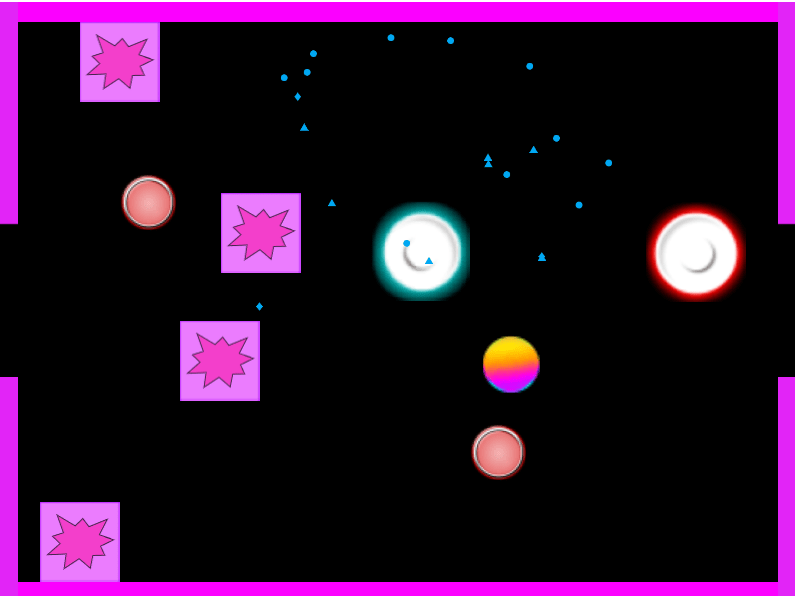
PhysicsObject in this project refers to a class which has a few variables and methods available that are relevant for objects that physics apply to. The class was not made by myself, instead it was included in the base project that students used for their projects. In case for this project, the objects seen below are all physics objects (Purple obstacles, red bumpers, blue/red pushers, rainbow puck).
Now that I’ve clarified the PhysicsObject class, it’s time to delve deeper into a few examples. Starting with our puck.
Puck class
The puck checks for collision with PhysicsObjects and walls. It does this seperately, because the walls are objects that don’t need to have physics applied to them and don’t move. Therefore, I made seperate methods for colliding with PhysicsObject and walls. First, let’s look at the collision with PhysicsObjects.
Colliding with PhysicsObjects
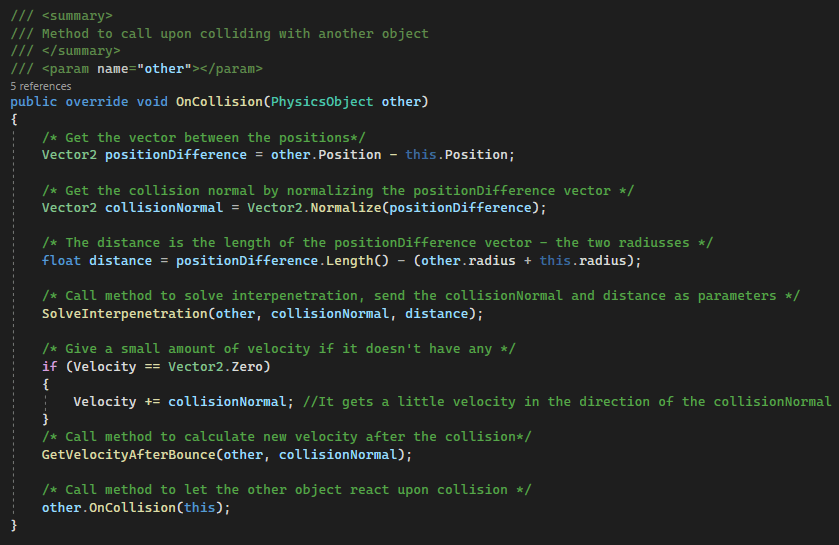
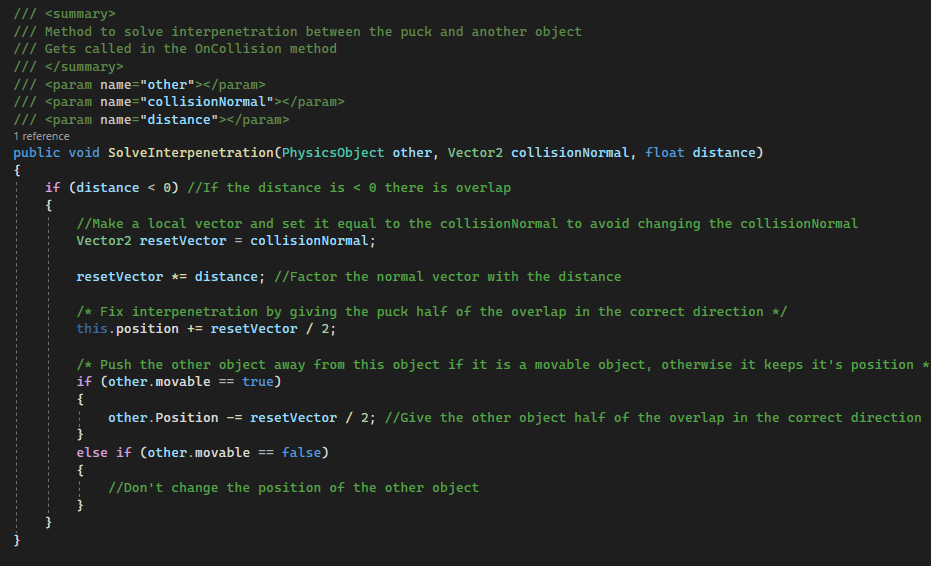
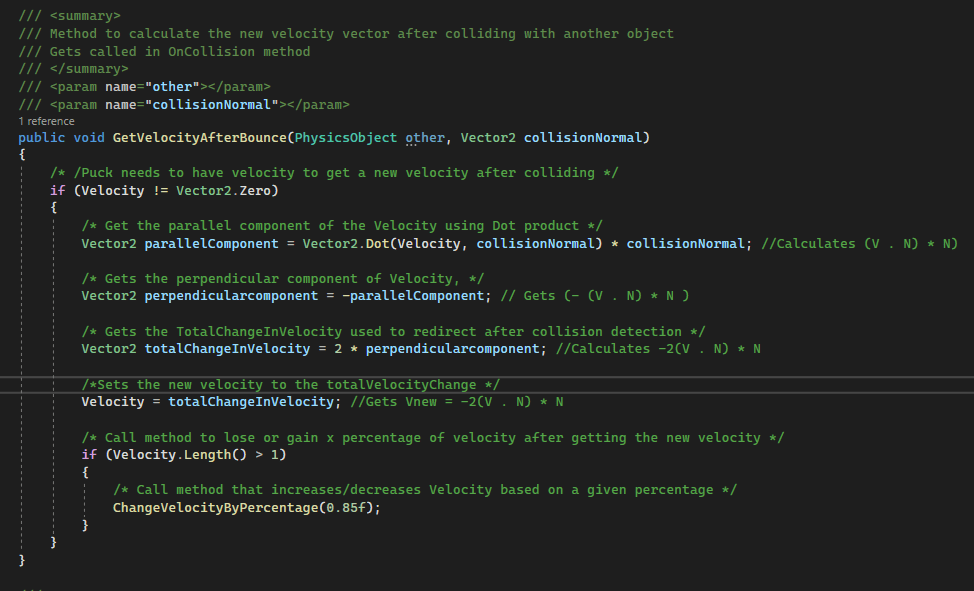
The OnCollision method solves the collision with the puck and other physics objects. In the method we get the collision normal, solve interpenetration and get a new velocity to make the puck move in a different direction with a new speed. We also call the OnCollision method for the object the puck has hit, this can be something like a obstacle to make it bounce for example. The SolveInterpenetration and GetVelocityAfterBounce methods look like this:
Colliding with walls
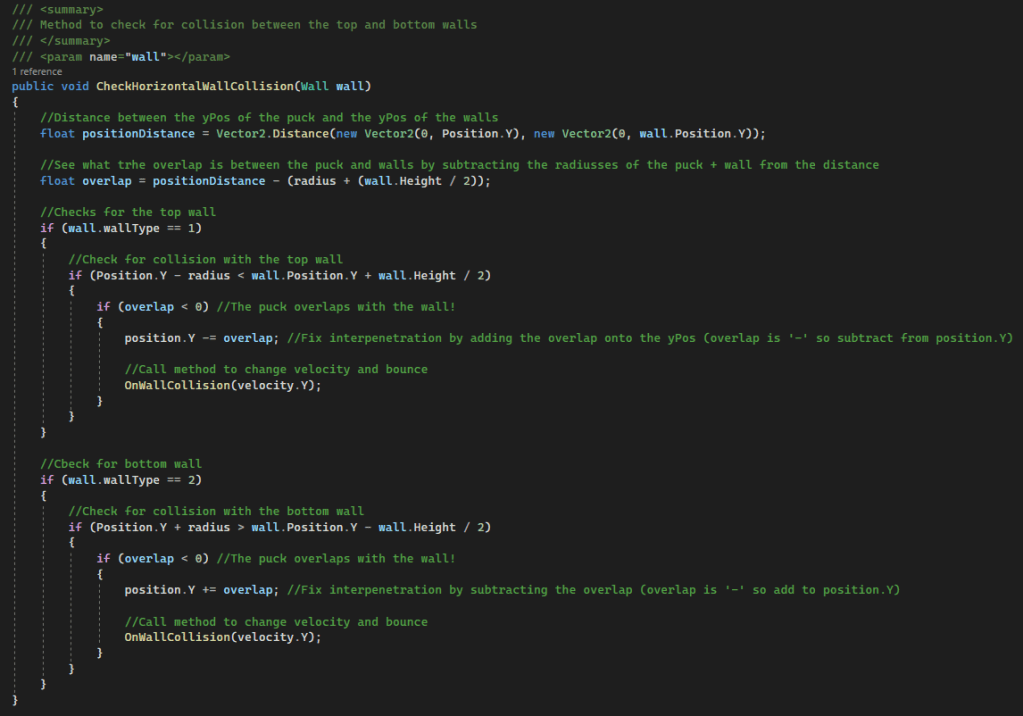
We handle and check for collision with walls separately, because the walls in the project have a constant position and don’t need to change or apply physics to them. To do this, we have a few functions to check for collision and act upon collision. We have two methods to check for collision with the walls, one for the horizontal placed walls at the top and bottom of the screen, and one for the vertical placed walls at the left and right side of the screen. These methods are nearly identical, the only difference between them is the component of the position vector that gets used to get the difference in position (x for vertical walls, y for horizontal walls). This is what it looks like:
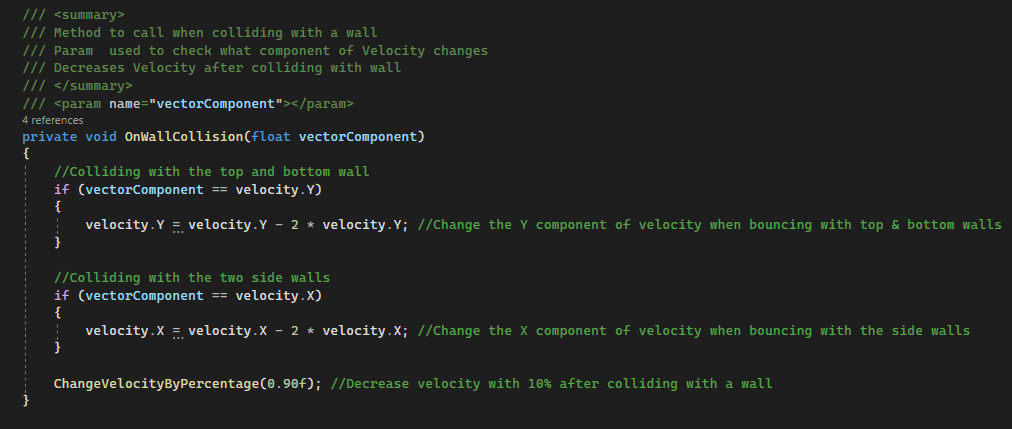
The OnWallCollision method takes a parameter to decide what component of the puck’s velocity needs to be changed. Inside the method, the velocity component gets flipped to make the puck move in the opposite direction. The method looks like this:
Obstacle class
Now, let’s look at few other game objects for the assignment: obstacles. These are rectangular objects that are placed in the arena. They had to be relatively heavy in comparison with the puck, and their purpose was to block the puck’s movement to make them move a different direction. Because these objects are rectangular and not circular, I had to handle collision differently. Here’s what I did:
Colliding with puck and other circles
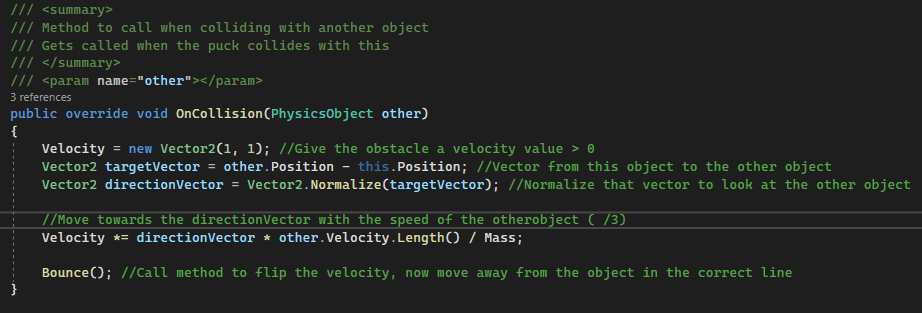
The OnCollision method gets called when the puck hits this object. In the method, the obstacle gets a velocity in the direction towards the puck, with the speed of the puck divided with the obstacles’ mass. Because the obstacle would now try to move towards the puck, we call the Bounce method to flip the velocity in the opposite direction so the obstacle will move the other way.
The puck itself doesn’t check for collision with the obstacles, the obstacles do this in their class. This looks like the following:
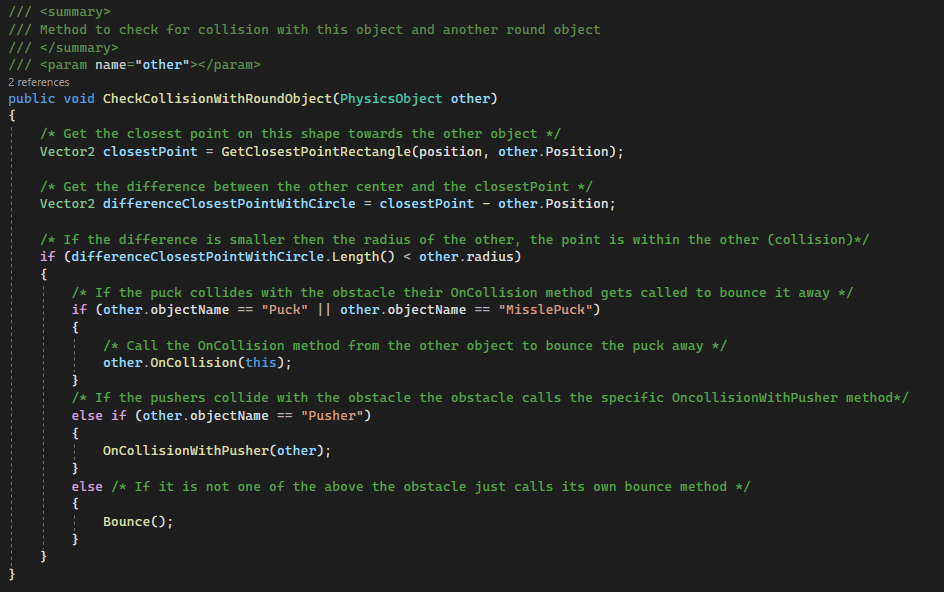
This method checks for collision with round objects and the obstacle. Because the object is rectangular, we need to get the closest point on the rectangle to calculate where the collision happened. We use the following method for this:
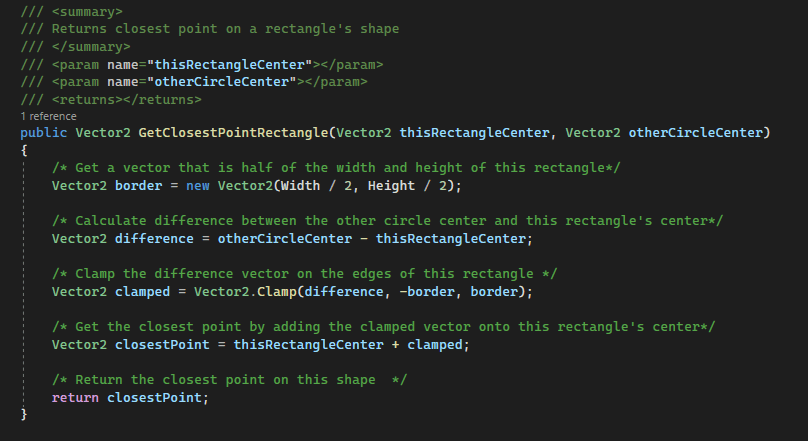
With this function we get the closest point on the rectangle towards the provided circle. Now we can check collision by looking if the difference between the closest point and the circle’s position is less then the circle’s radius. If so, we check if the circle is one of the pucks (missle puck is another object that can be used to shoot a new puck into the arena that steers towards the normal puck). If it is, we call the on collision function from the puck that will handle the physics by calling the OnCollision method from this obstacle after handling it’s own physics.
Colliding with other obstacles
The obstacles also need to collide with other obstacles in the arena. For this, I make the following methods:
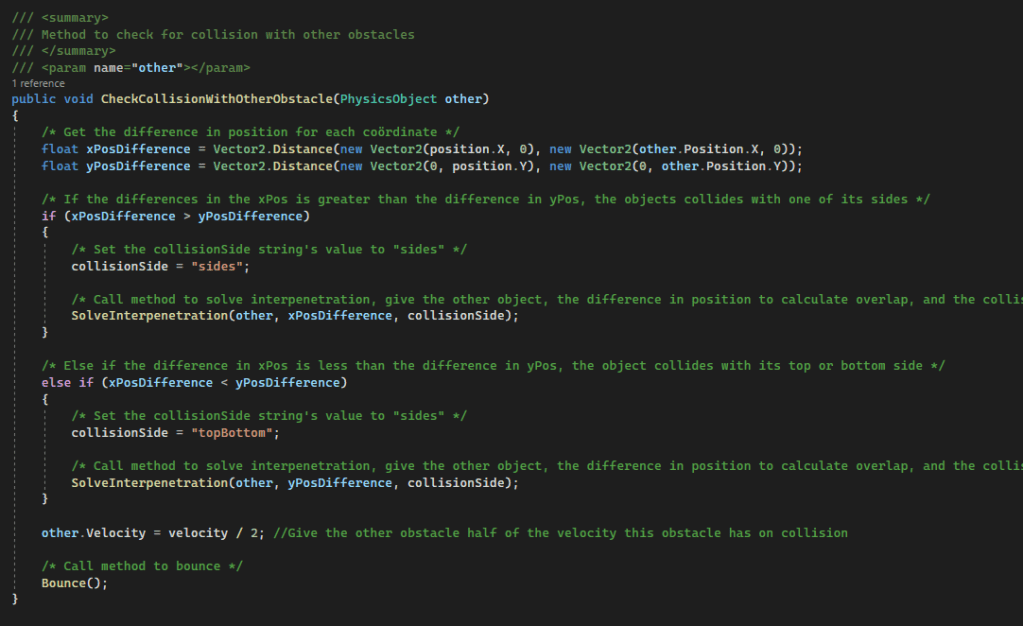
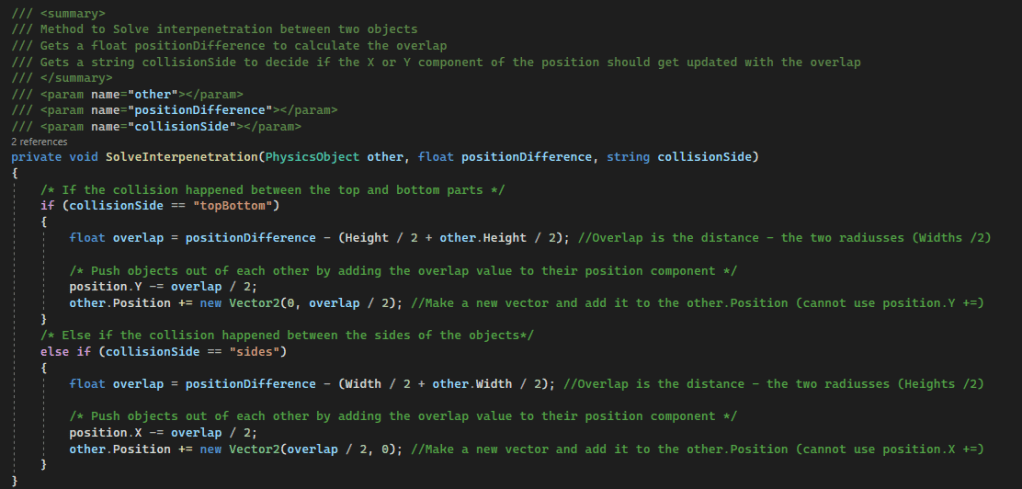
The method first solves interpenetration with the collision, then passes a bit of its own velocity to the other object to make it move. Then, the Bounce function gets called to flip the obstacle’s velocity so that it moves in the opposite direction. Here’s how the SolveInterpenetration method looks:
Conclusion
Working on this project has been incredibly rewarding. I learned a lot about physics and implementation of math. It has been super rewarding to see the puck collide with obstacles and bouncing off them in a normal and expected manner. In addition, I learned a lot about implementing lots of features into a single project and making interactions between them. At the end of the project, I felt like I had C# and Monogame under my belt and was in control and experienced with it’s workflow and contents. Furthermore, I felt experienced with working on a full project individually, where I started with a very small base and could add the whole content of a game by myself. This lead me to be more confident in my ability and more eager to work on solo projects, whether it be from school or outside of school.
 Sam Leguijt Portfolio